Content
Payment options in the WBE
protel WBE 4.0 offers your guests various secure ways of payment. Use a payment provider for immediate transfer of payment or credit card payments, or ask for the guests credit card information directly from the WBE.
Activating the payment provider
If you want to use the payment providers Sixcard, Payone or ConCardis to take care of your payments, you have to do some settings in the protel Cloud Center.
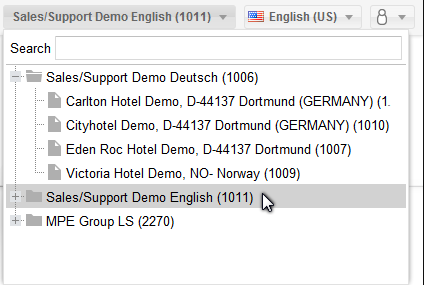
If your hotel belongs to a hotel chain, select the hotel level where the WBE has been compiled.
Open the menu Online Booking and click on the entry Channel configuration. Select the WBE directory and select tab Payment settings. There you will find the options for the various payment providers.
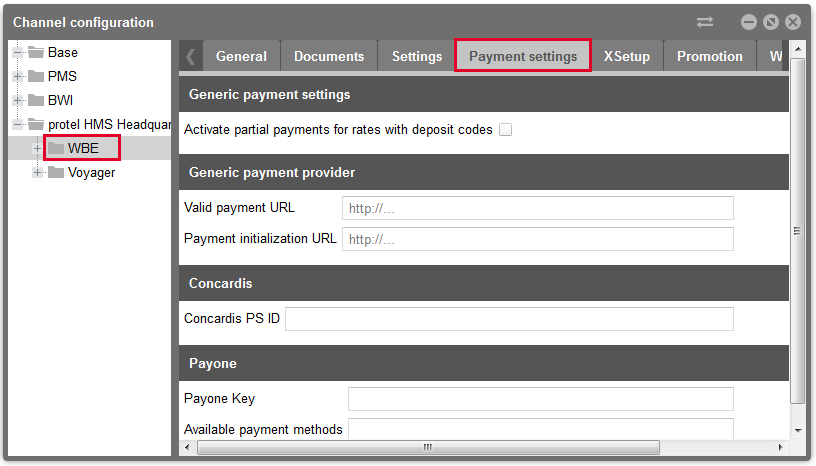
protel Cloud Center | Online Booking | Channel information | Payment settings
You will need to fill in the respective fields, depending on which payment provider you are using. The value you need to enter is described accordingly next to the entry field.
To set up the payment provider ConCardis you have to do some extra settings. These are explained in a separate chapter. Settings, you have to do for Payone, are described here. Also notice the Sixcard information described here.
Deposit payments via payment provider
If your hotel works with deposits, you can also request the deposit payments via the payment provider. Activate partial payments for rate codes with deposit codes. Select the check box in order to receive partial payments via the payment provider for WBE bookings which correspond with the respective deposit code.
Select a payment provider
Open the tab XSetups and go to the entry provider in the list. Enter the name of the payment providers in provider e.g., Sixcard or Payone (capital and lower-case does not have to be considered).

Activating a payment provider
There is also the XSetup paymode, which is used to activate your payment provider. Enter the value "live" or "test" into paymode. The value "test" activates the test mode; the value "live" activates the provider for your WBE.
 |
Do not forget! Before you switch to live operation, check to see that you have completely entered the above mentioned settings for the respective provider! |
After all of the XSetups have been set, the preparation in the protel Cloud Center for the payment provider is finished.