Status information
After all data has been set up and tested in protel Cloud Center your protel WBE is ready for live mode. You can call up the dialog "Channel configuration" to check the status of your WBE.
Open the dialog by means of the "Online booking" menu.
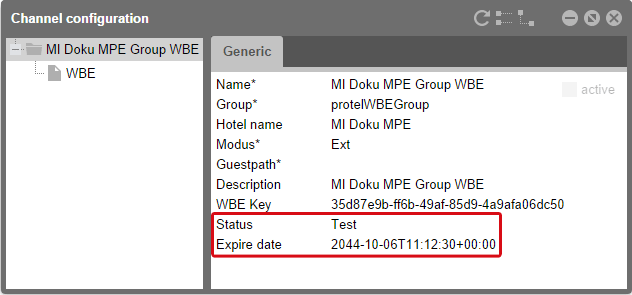
protel Cloud Center > Online Booking > Channel information
In addition to general hotel information and the status of your WBE (Test, Inactive or Active) you will also find the expire date of your test license. The expire date refers only to the status "Test"! When the test period is expired, your test WBE will become inactive. Contact WBE Support for switching your WBE from test to active status or contact them if you need to extend your test period. Once your WBE has the status "Active" the expire date does not matter anymore!